
1. Setup Process
To activate the RoomMaster PMS connection, please follow these steps:
-
Send a connection request: The local partner must email a PMS activation request to the Hotel Link Support Team at support@hotellinksolutions.com
-
Connection activation: The Hotel Link Support Team will activate the connection and confirm once it is completed. Because Hotel Link integrates with RoomMaster PMS using this PMS's API, Hotel Link will not provide the local partner with hotel ID and authentication key as usual.
-
Create required codes in Hotel Link Extranet: The local partner must log in to the Hotel Link Extranet and create the following codes:
-
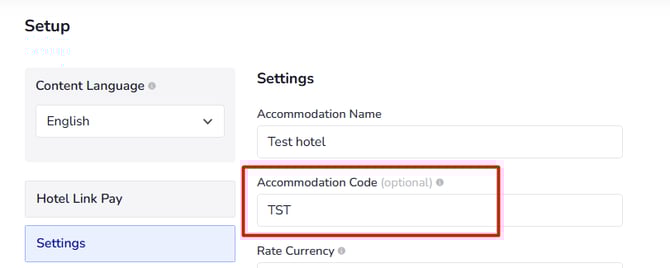
Accommodation code under the Booking Engine > Settings page
-
Room code and Rate Plan code under the Booking Engine > Rooms page
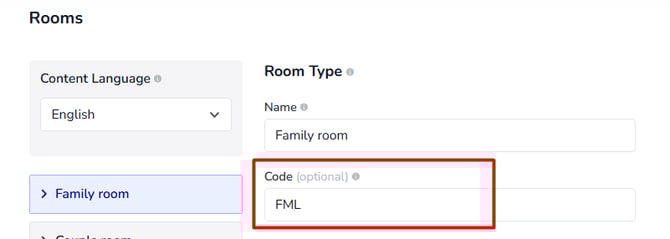
The local partner can add the code once. If they would like to edit the codes, please contact Global support team. -
-
Provide codes to RoomMaster: After creating the codes above, you must contact RoomMaster Support and provide the full list of codes so RoomMaster can complete the mapping on their side.
Important note
-
The Rate Plan code must include the Room code as a prefix, separated by a
|symbol. -
Example format:
ROOMCODE|RATEPLANCODE
2. ARI Updates from RoomMaster PMS
RoomMaster PMS supports both full load and delta load updates.
The following data is sent from the PMS to Hotel Link:
-
Rates
-
Availability
-
Min nights
-
Max nights
-
Close to Arrival (CTA)
-
Close to Departure (CTD)
-
Stop sell
These updates ensure availability and pricing remain synchronized across channels.
3. Booking Process
-
Booking retrieval
-
The PMS calls Hotel Link every 5 minutes to retrieve bookings.
-
New bookings are returned with the status Waiting for Acknowledge.
-
Once returned, these bookings will not appear again in the next retrieval call.
-
-
Booking ID format
-
The Booking ID returned to the PMS is the Channel Reference Number, not the Hotel Link Booking ID.
-
-
Booking acknowledgment
-
After successfully receiving a booking, the PMS must send an acknowledgment to Hotel Link.
-
If acknowledgment is not sent, the booking will be added to the Fallback list.
-
-
Fallback notification
-
If no acknowledgment is received within 6 hours, Hotel Link will send the Fallback list to your hotel’s email.
-
This ensures you are informed and can manage the booking manually if needed.
-
4. Amendment flow
-
OTA-modified bookings
-
Any bookings modified by the OTA will be included when the PMS retrieves bookings.
-
If a booking is replaced by another booking, it will be resent with the latest modifications.
-
-
Manually modified bookings in Hotel Link
-
Bookings manually edited in Hotel Link will still be sent to the PMS.
-
However, if the OTA later modifies these bookings, Hotel Link will not process the update. In such cases, Hotel Link will send an automated email titled “Action Required: Booking Modification from OTA Alert” to the hotel. To learn which booking change will result in this kind of email, click here. You must then manage these bookings manually.
-
5. Common issues and limitations
You should be aware of the following common issues:
-
Connection interruptions caused by poor internet:
-
Island areas
-
Low server configuration
-
Servers turned off at night
-
-
The reported issues are internal PMS errors; therefore, no request/response logs are available.
-
Innquest does not provide support; only the local staff offers assistance.
If you face any difficulties when integrating with RoomMaster PMS, please reach out to our Hotel Link Support Team at support@hotellinksolutions.com