
What is "Action Required: Booking Modification from OTA Alert" email?
The email is sent when booking modifications affect stay dates or booking values that cannot be processed automatically. It is a notification for the hotel to review and manage the booking manually to avoid operational issues.
The email only happens when the booking is from OTA.
When is this email triggered?
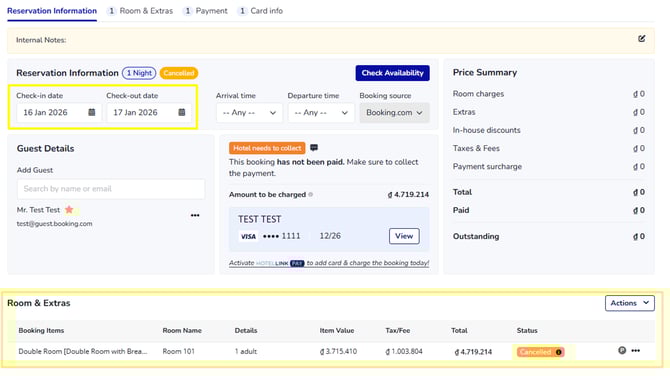
You will receive the alert email when a booking is modified in ways that impact core booking data, including the areas highlighted below.
-
Changes to Stay Dates
Any modification to the check-in date, check-out date to extend or shorten the stay is considered a booking modification.
-
Changes in the Room & Extras section
Edits that affect the value or structure of the booking are treated as modifications, such as:
-
Changing the quantity of booked rooms or booking items
-
For example: Reducing the number of booked Double Rooms from 2 to 1.
-
-
Changing the booking amount (total booking amount or rate per night)
-
For example: Updating the total booking amount from €120 to €100.
-
-
Adding a new booking item or booking extra
- For example: Adding new room type, airport transfer service to an existing booking.
-
Changing the room type
- For example: Changing the booked room from a Standard Room to a Deluxe Room.
-
Deleting a room type/ booking item
- For example: Removing one room from the booking or deleting an added extra such as breakfast.
- Editing room-related booking items (number of guests, tax & fee)
- For example: Updating the number of guests from 2 to 4.
-
In simple terms, any change that alters booking values in this section will trigger the email.
What does NOT trigger this email?
The following actions are not considered booking modifications and will not trigger the email:
-
For Front Desk users: allocating or assigning a physical room to the booking

-
Internal operational actions that do not change prices, room items, or stay dates
These actions are internal and do not affect how the booking is handled.
What should the hotel do?
When you receive the "Action Required: Booking Modification from OTA Alert" email:
-
Review the booking changes carefully
-
Handle the booking manually as needed
-
Ensure the final booking details are correct for your operation