
Why is this workaround needed?
Hotel Link currently supports entering Extra Guest information only, not Extra Bed pricing. Previously, Hotel Link used the first adult’s information under Extra Adult to send Extra Beds information. However, we received feedback that this approach was inaccurate, so Hotel Link stopped sending Extra Bed information.
As a result, extra bed pricing cannot currently be set up in Hotel Link. This affects properties that want to set up extra bed pricing for the first time, as well as those that want to adjust their existing extra bed pricing. For these cases, the pricing needs to be managed on Agoda.
The extra bed information setting will be available in a future update. Until then, you can use the workaround below to set up or adjust extra bed pricing directly on Agoda.
How to set up
- In Hotel Link, set Stop Sell (override on Agoda).
- Disconnect the connection between Hotel Link and Agoda. The Stop sell will still remains as Agoda keeps the last update from Channel Manager.
- Go to Agoda and set up or adjust the extra bed pricing:
- Log in your Agoda account.
- Select Propery > Rooms tab.

- Select a room that you want to set up extra bed information.
- In Room occupancy tab, select Child & extra bed rates and occupancy.
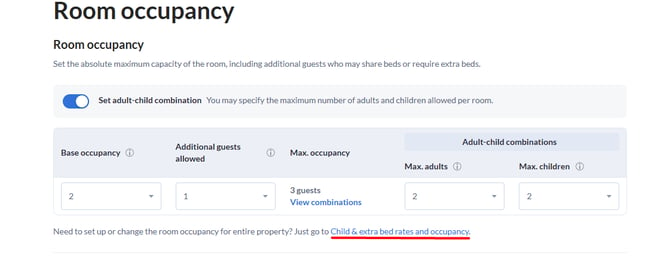
- Once done, go back to Hotel Link and reactivate the connection.
Note: Please remove the Stop sell (override on Agoda). Then, fetch room and re-save mapping to ensure the connection works fine.
Limitation
Setting Stop Sell means the property is not visible to travellers during the setup period. No bookings can be made during this time. We recommend choosing a low-demand period to carry out these steps.
In case you cannot set up extra bed pricing on Agoda, please contact your local Agoda market manager or Hotel Link Support team (support@hotellinksolutions.com).