
This function is only applied for Hotel Link Pay users. If you have not activated Hotel Link Pay, read this article.
What is a void transaction?
When a booking is created with Hotel Link Pay, the guest's card is charged right away. If you need to cancel that charge for any reason (for example: due to a booking cancellation or an incorrect amount, etc.), you can void the payment. The payment will then return to the guest's card.
To see how it differs from a refund transaction, read this article.
How it works
Void transactions can only be processed within a specific time window. The exact void time limit may vary depending on the currency and the guest's country. For example, it may be 6 P.M. AEST in Australia or 4 P.M. (GMT+7) in Vietnam, and so on. After this period, the transaction is settled and only refund transactions are possible.
Once confirmed, the void removes the transaction from your batch entirely. It will not appear on the guest's credit card statement.
Step-by-step guide
To void a payment, please do as following:
- Go to the booking details.
- Scroll down to the payment section. In the payment section, find the transaction with a Received status that you want to void.
- Click the three-dot menu on the right side of the payment and select 'Void payment'.
- A confirmation dialog will appear showing the total booking amount to be voided. In the confirmation dialog, enter the reason for voiding the transaction. Check the box if you want to send a transaction email notification to the guest's email.
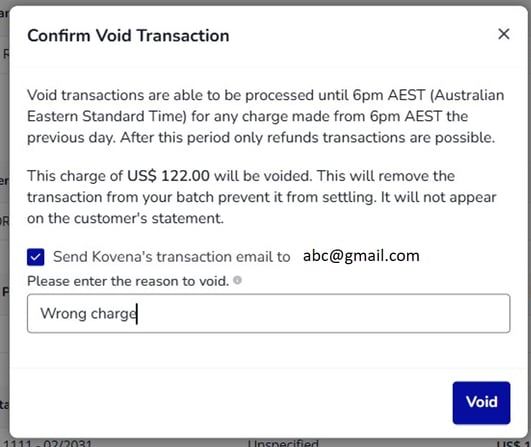
- Once done, click 'Void'.
The voided transaction will appear as following:
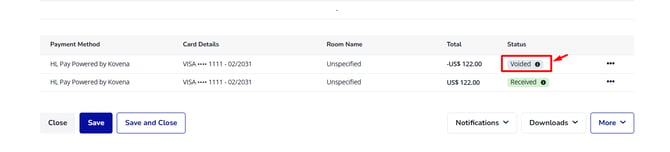
In case the void option is no longer available, you can refund the payment instead. Read this article to learn how to refund a payment with Hotel Link Pay.
How to view a voided transaction
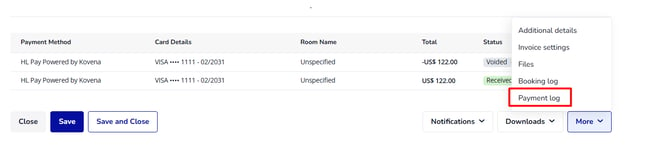
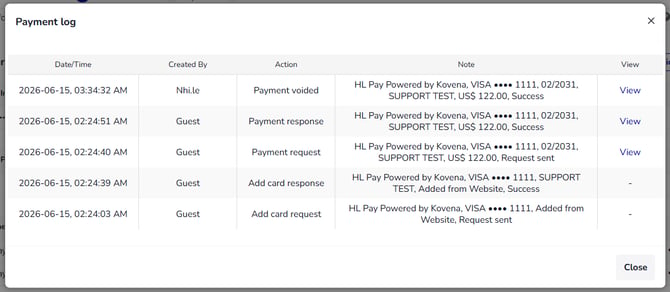
To view the a voided transaction, you can access More > Payment Log to view the transaction details.
Troubleshooting & Frequently cases
When processing a void transaction with Hotel Link Pay, you may encounter some issues. Below are the most common cases and how to handle them.
1/ Error 2003 - The transaction was declined:
-
Root cause: Transaction declined by upstream system/bank or there is some restriction on the card that is disallowing refunds.
-
Solution:
-
Verify the card information, correct any errors, and retry the transaction.
-
Advise the guest to try another card or contact their bank.
-
2/ Error 300 - An error has occurred, you do not have enough funds to perform this action:
-
Root cause: There are not insufficient funds in your card to proceed the transaction.
-
Solution:
- Check the transaction details, correct any errors and retry the transaction.
- Contact Hotel Link Global Support (support@hotellinksolutions.com) for better assistance.
3/ The payment is declined because the issuer suspects that it is fraudulent
-
Root cause: The guest's card issuer bank declined the returned transaction. This can be because the card reported lost or stolen, etc.
-
Solution: Advise the guest/cardholder to contact their bank for more information.
For more troubleshooting & frequently cases, you can read this article.