
What is 'WhatsApp booking notifications' feature?
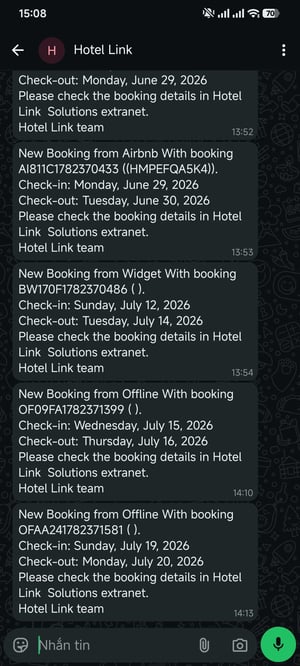
WhatsApp Booking Notifications is a new feature in Hotel Link that lets your hotel receive instant booking notifications directly through your registered WhatsApp account. When a booking is created, is cancelled, or is modified, your team gets notified on WhatsApp right away.
This feature is applied for offline bookings, direct bookings (bookings from Website, Booking Widget) and OTA bookings.
This feature replaces the SMS notification method, which was restricted in several countries. With WhatsApp, notifications are more reliable, delivered instantly, and free of the limitations that affect SMS in many regions.
For example:
Step-by-step guide
Follow these steps to register your WhatsApp number and start receiving booking notifications.
- Go to Booking Engine → Setup → select the Notification tab.
- Set up your WhatsApp account:
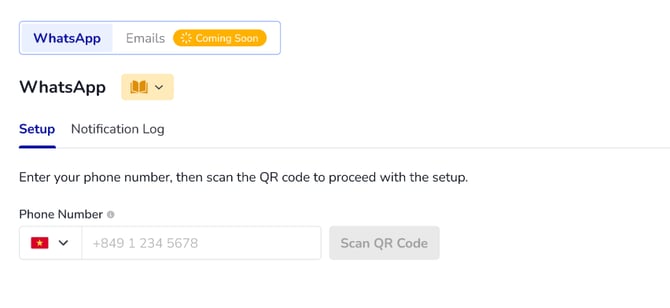
- Enter your WhatsApp number: Enter your hotel's WhatsApp number in E.164 format (e.g. +84 901234567).
- Click Activate.
- Set up notification: Select which booking notification type you want to be notified about: New Booking, Cancelled Booking, Modified Booking or Unhandled booking. Modified Booking or Unhandled booking are only for OTA bookings changed on the OTA's side.
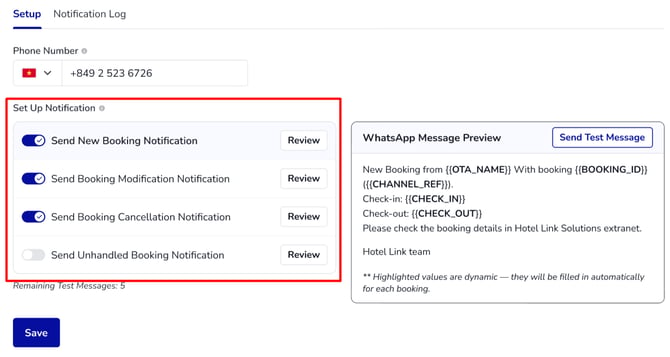
Recommended: Click Send Test Message to check if you receive the test message for the notification type you have enabled, before clicking Save.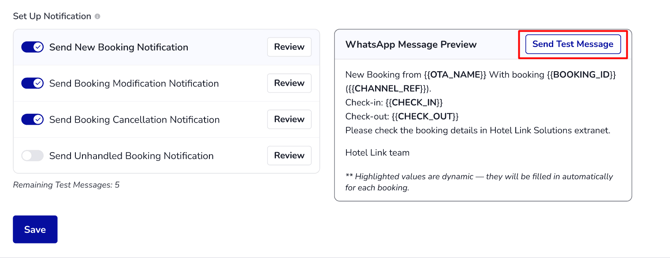
- Click 'Save' to apply your settings.
Your hotel will now start receiving WhatsApp notifications for the selected booking notification type.
View notification log
Go to the Notification Log to view the full history of all sent messages. Filter by timestamp type, date range, message status, Booking ID/ recipient phone number.
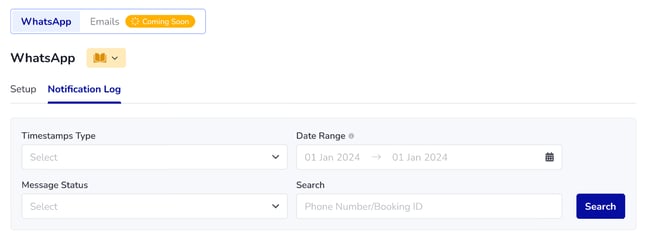
The Notification Log includes the following columns:
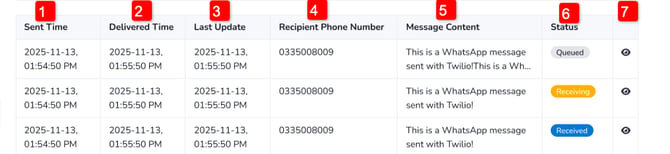
- Sent Time: The time that Hotel Link sent the message to Whatsapp.
- Delivered Time: The time that Whatsapp delivered the message successfully to the recipient.
- Last Update: The time of the most recent status update for the message.
- Recipient Phone Number: The phone number that received the message.
- Message Content: The content of the notification message.
- Status: The current delivery status of the message.
- View Details: Click to expand the full log details for that message.