
To use this feature, you have to connect to Airbnb. To learn about Airbnb connection, click here.
Why is this feature important?
With this feature, hotel clients (hosts) can review Airbnb quality metrics directly within Hotel Link, without accessing the Airbnb platform.
By using this feature, you will:
- Identify specific service areas that need improvement based on Average review scores by category (Cleanliness, Accuracy, Communication, Check-in, Location, Value).
- Quickly assess listing quality and overall guest satisfaction by overall performance score and 5-star rating rate.
- Understand common guest complaints and prioritize corrective actions through top negative tags.
- Detect risks early and prevent listing warnings or suspensions using listing status breakdown and alerts.
How to use Airbnb Quality Dashboard
Go to Channel Manager, on the OTAs' list, click Airbnb > choose Quality Dashboard tab.
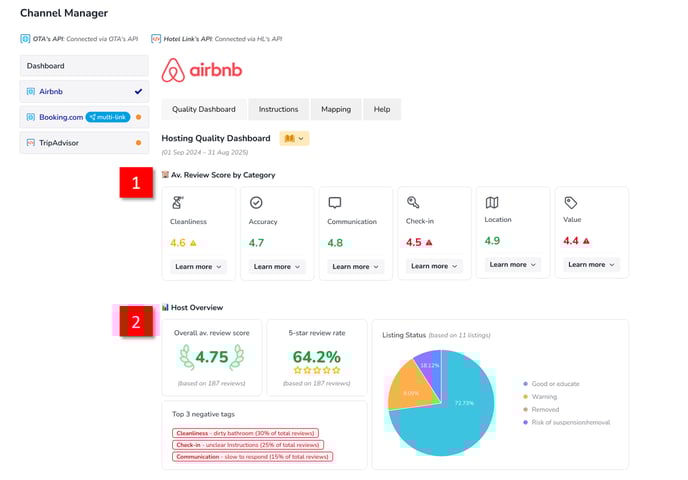
On top of the dashboard, there will be:
- 'How it works' table to know how to use this feature.
- The dashboard period: When the user opens the Quality Dashboard tab, the system automatically displays data for the most recent 12 months, including the current month.
For example: If the current date is 08 Aug 2025:
→ Current month: Aug 2025
→ Start date: 01 Sep 2024
→ End date: 31 Aug 2025
→ Displayed period: 01 Sep 2024 - 31 Aug 2025
In the dashboard, there are 2 main sections:
Our system automatically retrieves the latest data from Airbnb by calling the API every 3 days and updates the dashboard accordingly.
Av. Review Score by Category
This section shows your average ratings based on guest reviews across key categories:

-
Cleanliness: how clean and tidy the space is upon guest arrival.
-
Accuracy: how closely your listing description matches the actual space.
-
Communication: how promptly and helpfully you respond to guests.
-
Location: how guests feel about the area and convenience of the location.
-
Check-in: how smooth and easy the check-in process is.
-
Value: how guests rate the overall value for the price paid.
Each category has the displayed elements as following:
- Average score: The average rating from guest reviews, rounded to one decimal place. If the score is:
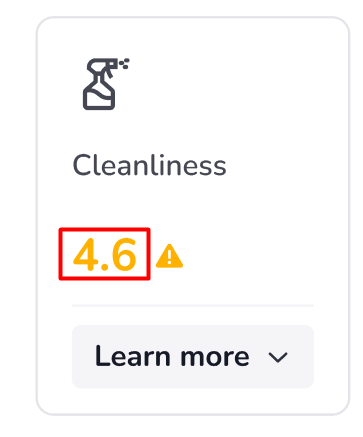
- Green (4.7 or higher): Good performance.
- Yellow (4.6 - 4.69): Below the recommended level.
- Red (below 4.6): Low performance that needs attention.
-
- Tips & guidance: To improve the average score, you can hover over the status icon to see tips or the standard you should meet. The icon appears only when the score is below or close to the recommended level.
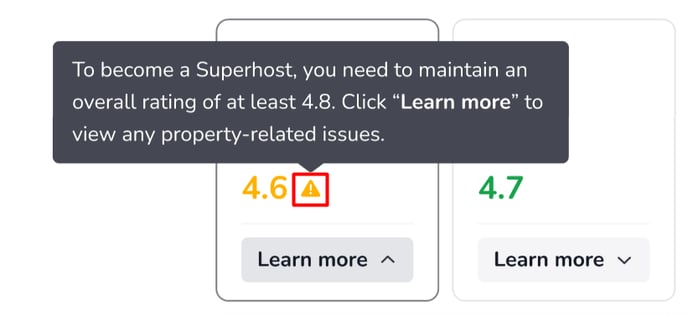
- Learn more: Click Learn more to view detailed information for that category.
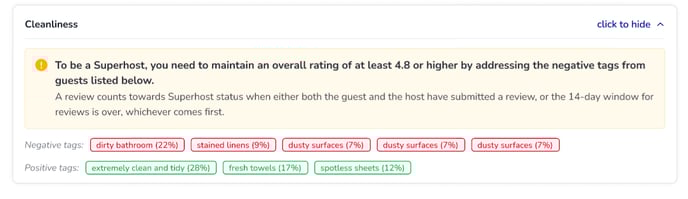
In the 'Learn more' detailed view, in will include:
-
See the Superhost standard and how review scores are calculated.
-
Negative tags show common guest complaints with percentages.
-
Positive tags highlight strengths mentioned by guests with percentages.
Host overview
This section provides a snapshot of your hosting performance:
-
Overall av. review score: total average rating from all guest reviews. The review score will be displayed in the following colors:
-
Green (4.7 or higher): Good score.
-
Yellow (4.6 - 4.69): Below the recommended level.
-
Red (below 4.6): Low score that needs attention.
-
-
5-Star review rate: the percentage of reviews that gave your listing a full 5-star rating. The review rate will be displayed in the following colors:
-
Green (≥ 40%): Good performance.
-
Yellow (30% to under 40%): Below the recommended level.
-
Red (< 30%): Low performance.
-
-
Listing status overview: a chart showing the number of listings and their current status Good or educate, Warning, Risk of suspension/removal and Removed.
-
Top 3 negative tags: the most frequently mentioned concerns in guest feedback, helping you focus on what matters most to guests.
To learn how to use Airbnb Guest Reviews, read this article.